How to use The Handy hands-free
The Handy is a handheld stroker. It moves a sleeve back and forth, but the body has to be held or mounted, so going hands-free is what makes VR and any app-driven session work: your hands are on the headset controllers or on the arousal control rather than on the device. There are two routes. The official one is the Handsfree Desk Mount, a clamp that fixes to the edge of a desk and holds the device at several angles. It is sold separately on both the Handy 1 and the Handy 2, and the Handy 2 also has two built-in mounting points. The other is a do-it-yourself rig built from photography hardware, which is what I run after the official cup broke on me. Both hold the device steady. The difference is freedom of positioning and what you are willing to source.
Why hands-free is the point, not a nice-to-have
It took me a while to treat this as the main way to use the device rather than an extra. The moment it clicked was VR. With a headset on, both hands are on the controllers, and there is no free hand for the device. Without a mount, the whole session simply does not happen.
The same is true, less obviously, of any app-driven session. The reason I built The Edgy around a single arousal control is that your hand belongs on that control, reporting where you are, while the device does the work. That only works if the device is held by something other than you. Hands-free is not a comfort feature here, it is what lets the software steer the session at all.
So this is the mode I optimise for, and the mode most reviews barely mention. If you are buying the device to use it with an app, with VR, or with scripts synced to a scene, budget for the mount from the start. It is not optional to the experience.
The official mount, and how it is packaged
The official hands-free setup is two pieces. The Handsfree Desk Mount is a clamp that fixes to the edge of a desk, and in three years it has done its job well: it holds the device, it holds several angles, and it has never given me trouble. The Handsfree Cup is the part that seats the device in the mount, and that is the part to keep an eye on, for reasons I get to in the next section.
Neither is in the base box. What ships with the device is the device, a sleeve, a band and a power supply. The hands-free hardware is a separate purchase on both generations, which is why the mount tends to be bought as part of a bundle: the Full Handsfree Bundle is device plus mount plus cup, and the Most Wanted Bundle wraps that together with the Pro Band and two sleeves, which is close to the setup I actually run.
One real plus for Handy here, and it matters more once you know the cup can break: they publish the 3D files for the cup on Thingiverse under their own account, assembled with a bolt and a quarter inch screw. A company that hands you the files for the part most likely to fail is paying attention. And that quarter inch thread is the same standard photo tripods use, which is the whole reason the DIY route below works.
Disclosure: Some links above are affiliate links. I may earn a commission at no extra cost to you. It funds The Edgy and never affects what I recommend.
The cup is the part that broke
I want to be precise about the blame, because it would be easy and unfair to be vague and say the mount failed. It did not. The desk mount arm has been fine. What broke was the cup: the plastic around its screw insert gave way, so it could no longer be tightened. It did not tear or split, it lost the spot the screw grips into. Mine went roughly a year in, which is soon for a part you build a whole setup around, and it is the reason I treat the cup as the piece to watch. If you own one, that is the exact spot to check on yours before it goes.
There is a second data point worth putting next to mine, with its label attached. A third party review reports screws stripping on the mounting hardware of the Handy 2 Pro. That is a different generation from my Handy 1, so I will not merge the two into a single claim, but taken together they make me call the hands-free hardware the weak link of the range, while keeping each observation attached to the device it came from.
When the cup went, I did not buy another one. I rebuilt the whole hands-free side from photography hardware, and it has held since. That is the rest of this page.
The DIY rig, with exact parts
First, an honest framing so nobody misreads this. I did not replace the official mount because it was bad. The desk mount arm is good. I replaced it because the cup broke, and since I was rebuilding the mount anyway, I took the chance to gain freedom of positioning on a clamp that takes far more load. If your cup is intact, you do not need any of this. If it broke, or you want to place the device somewhere the official clamp will not reach, here is exactly what I use.
There is a whole do-it-yourself scene around mounting this device, some of it really clever: clamp-on portable tables, belt rigs, all sorts. So I am not claiming to have invented hands-free. What I have not seen written down is this exact recipe, with the parts and the dimensions, and all three of mine come from outside the sex-tech world. They are photography hardware.
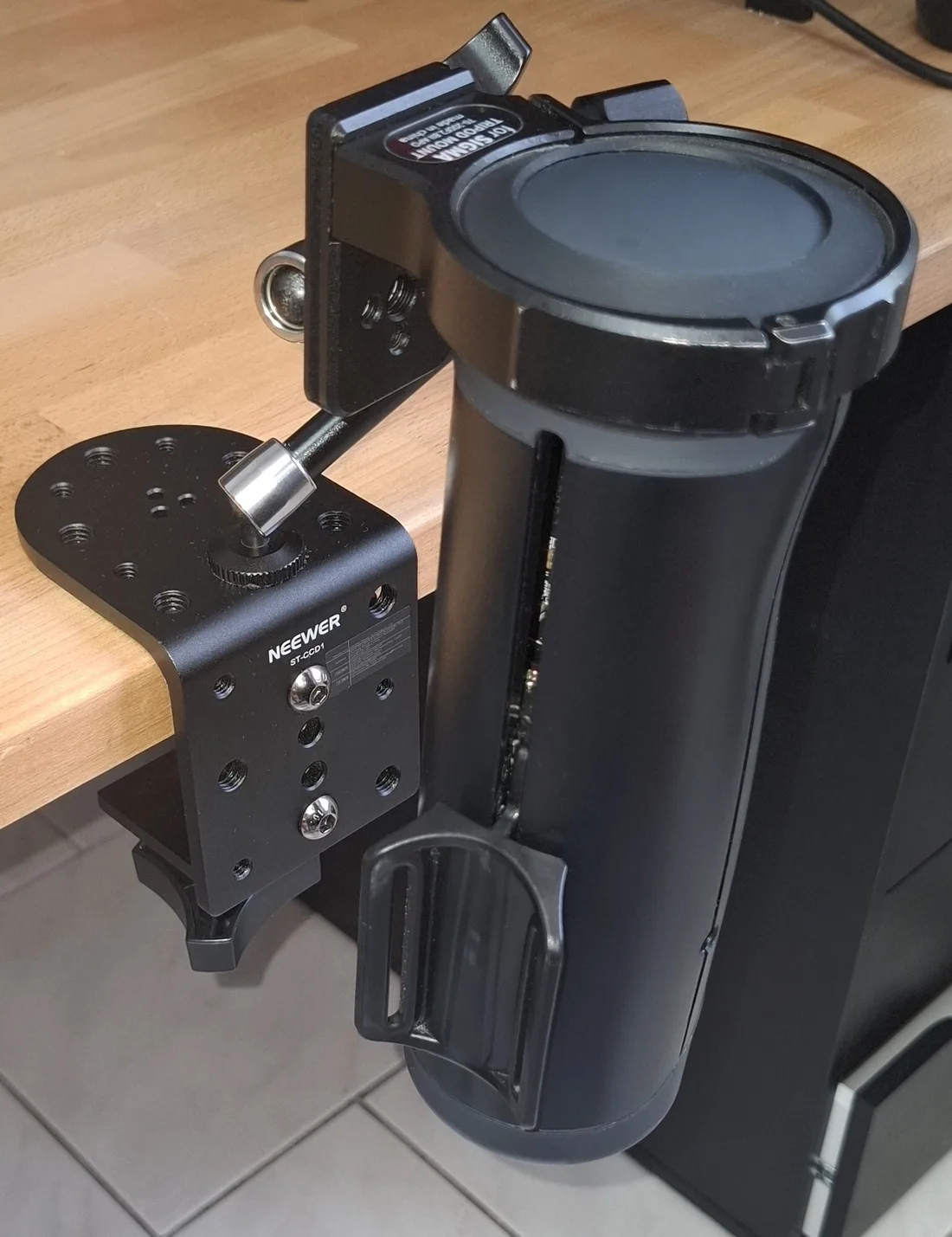
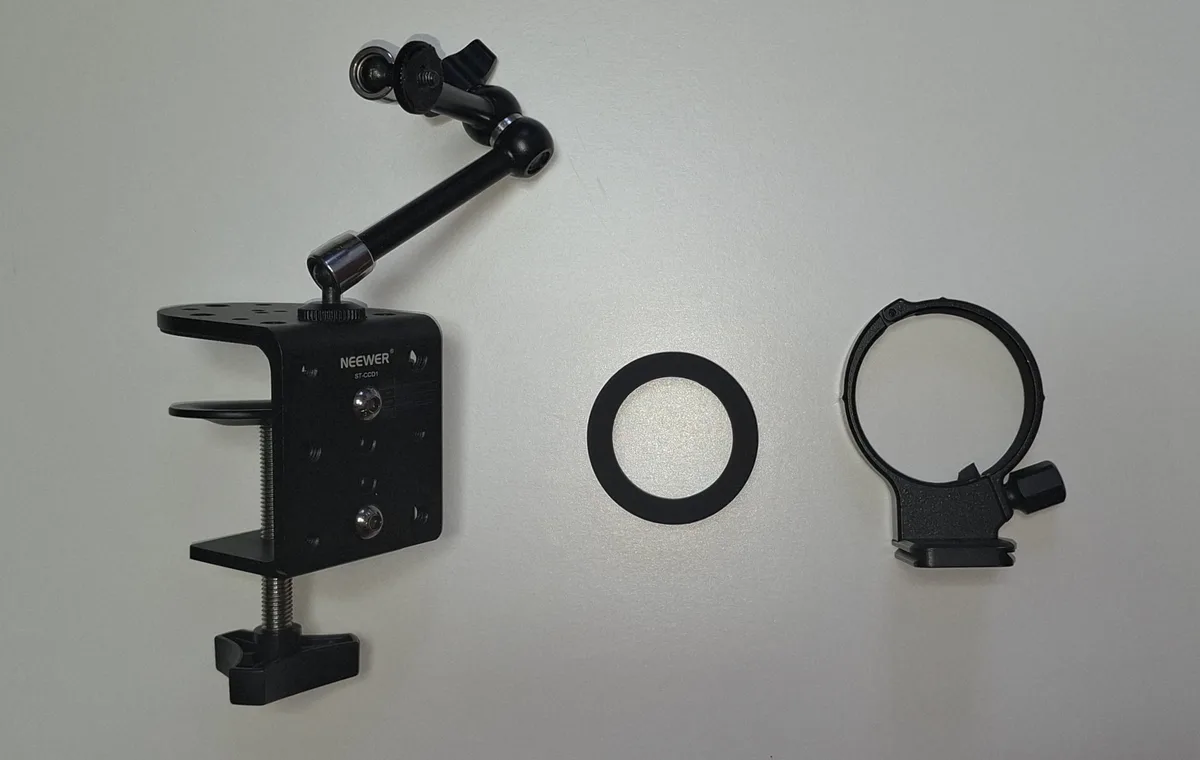
Photo C-clamp
NEEWER ST-CCD1
Clamps to the edge of the desk with a mounting column and articulated arm. Quarter inch and three-eighths threads, rated to 20 kg, fits desks 5 to 100 mm thick. This is what replaces the original clamp and buys the freedom of positioning.
Tripod ring
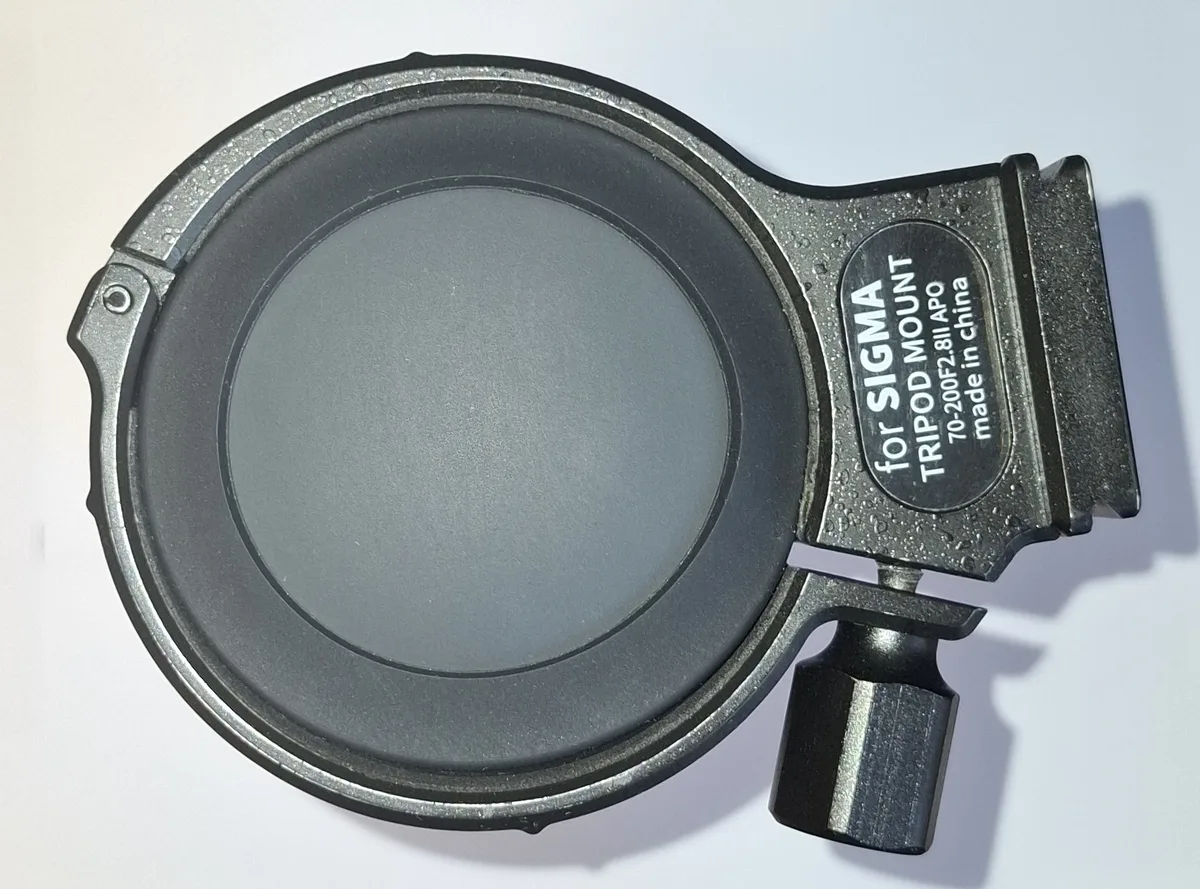
71 mm, Hersmay (for Sigma 70-200 F2.8)
Closes around the body of the device and offers a standard photo thread. A camera lens collar, repurposed.
Silicone spacer
70 mm silicone bottle sleeve
Sits between the device and the ring. It fills the gap, since the ring area of the body is a bit over 65 mm while the ring is 71 mm, and it lets the ring hold without marking the shell. It is also what actually grips.
Why the silicone spacer is not optional
This is the part that turns a rough hack into something reproducible. The body of the device is 70 mm across, but the area near the top where the ring sits is narrower, a bit over 65 mm, and slightly rounded. Those numbers are by hand and not off a caliper, but a 71 mm ring will not close cleanly on that narrower, rounded surface whatever the exact figure. The silicone sleeve fills the gap, so the ring holds, and because it is soft it grips without marking the shell. It is a fix backed by a measurement, not a rough hack.
The assembly, step by step
- Slide the silicone sleeve over the body of the device.
- Close the tripod ring around the silicone sleeve.
- Tighten only until it holds. The sleeve grips, the ring just keeps it in place.
- Screw the ring onto the C-clamp arm through its photo thread, clamp the whole thing to the desk edge, and set your angle.
Do not tighten it all the way. A metal ring tightened hard onto a plastic shell can crack it. Nobody has broken a device this way that I know of, so treat this as a mechanical precaution rather than a reported accident, but the natural reflex with any clamp is to keep turning until nothing moves, and here that reflex can cost you the device. The right amount is just enough to hold. The silicone spacer does the real work. You are building this on your own responsibility, so go gently.
Two closing notes. This is more capable than what it replaces, not just equal to it: the clamp is rated to 20 kg and fits any desk up to 100 mm thick, so placement stops being a constraint. And if you would rather not source three parts, the official desk mount is a perfectly good answer, and the cup files are on Thingiverse if that is the piece you need to replace.
Hands-free on the Handy 2
The official FAQ states that the Handy 2 has two built-in mounting points for hands-free setups, and the store adds that it works upright, flipped, or with a VESA monitor mount. The Desk Mount Kit is still a separate purchase rather than something in the box.
I now run a Handy 2 hands-free too, and in practice it is simpler than the Handy 1. A camera-style arm screws straight into one of those mounting points, so the photo-gear rig above carries over minus one part: the tripod ring does not fit around the Handy 2's more rectangular body, and it is not needed, because the arm goes straight into the device. I kept the same clamp and arm, and the result takes less room and holds well.
One precaution. Each stroke pushes and pulls on the mounting point you use, and over months that is where something could break. The one third party report I have seen of stripped screws was on a Handy 2 Pro, which is one more reason to be careful with it. I use the mounting point on the bottom of the device, so the arm sits in line with the motion and takes the least strain. What I have not tested is the official Desk Mount Kit on the Handy 2, so I cannot tell you yet whether it holds up better than the cup that broke on my Handy 1. My full notes on the device are in my Handy 2 review.
Deciding between the two generations rather than just mounting the one you have? The full three-year review and the Handy 2 review cover both generations from use, and the stroker comparison is the place to start if you are not even set on a Handy. If you want hands-free with no mount to buy at all, that comparison is also where the stand-on-their-own strokers live.
Frequently asked questions
How do you use The Handy hands-free?
The Handy is a handheld stroker: it moves a sleeve back and forth, but you hold or mount the body, so during a session it is either in your hand or in a mount. To go hands-free you clamp it to something. The official route is the Handsfree Desk Mount, which fixes to the edge of a desk and holds the device at several angles, together with the cup that holds the device in place in it. It is sold separately on both the Handy 1 and the Handy 2, and the Handy 2 also has two built-in mounting points. The alternative is a do-it-yourself rig, which is what I use after the official cup broke on me.
Does The Handy come with a mount?
Not in the base box. What ships with the device is the device, a sleeve, a band and a power supply. The hands-free hardware, the desk mount and the cup, is a separate purchase, and it is bundled in packs like the Full Handsfree Bundle or the Most Wanted Bundle. So check the pack contents before you assume a mount is included.
What is the best mount for The Handy?
For most people the official Handsfree Desk Mount is the straightforward answer: it clamps to a desk, holds several angles and does its job well. The part to watch is the cup that holds the device in place, not the mount arm. If you want more freedom of positioning, or you need to replace a broken cup, a photography C-clamp with a 71 mm tripod ring and a silicone spacer does the same job and takes far more load. I run the DIY version.
Why did my Handy hands-free cup break?
On my Handy 1 the plastic around the screw insert of the cup broke, which meant it could no longer be tightened. It did not tear or split, it lost the spot the screw grips into, so that is the spot to check on yours. The desk mount arm itself was never the problem and still holds fine. If it happens to you, Handy publishes the 3D files for the cup on Thingiverse under its own account, and the mount thread is a standard quarter inch photo thread, so there are ways back.
Can I 3D print a mount for The Handy?
Yes. Handy itself publishes the cup files on Thingiverse under its official account, assembled with a bolt and a quarter inch screw, and there is a third party ecosystem of printable Handy mounts and clamps beyond that. The quarter inch thread on the official cup is the same standard used by photo tripods, which is exactly why a photo rig works as a replacement.
Can you use the Handy 2 hands-free?
Yes, and it is easier than on the Handy 1. The body has two built-in mounting points, and a camera-style arm screws straight into them, so you do not need a cup or a ring. That is how I run mine, with the clamp and arm from my Handy 1 rig. I use the mounting point on the bottom of the device, so the arm sits in line with the motion and takes the least strain. Handy also sells a Desk Mount Kit for it, separately rather than in the box; I have not used that kit on the Handy 2.
Do I have to hold The Handy the whole time?
Only if you have no mount. It moves a sleeve back and forth rather than moving itself against you, so it needs something to hold it steady, which is either your hand or a mount. The whole reason hands-free matters is that it frees both hands for VR controllers or for an app that steers the session, which is where the device is at its best.
What I would buy
If you are starting from nothing and want the device with the hands-free setup in one go, the bundle is the sensible buy, and reasonably priced as a bundle rather than bought piece by piece. It is close to what I actually run, and it brings the Pro Band that should have shipped as standard. One thing belongs in the same breath: that bundle includes the cup, and the cup is the part that broke on me. Buy it knowing where to watch for wear, and knowing there is a way back if it goes, whether that is the Thingiverse files or the photo rig above.
If you already own the device and just need to mount it, the desk mount on its own is the clean answer. And if the cup has already broken, you now have the full parts list to route around it.
Disclosure: Some links above are affiliate links. I may earn a commission at no extra cost to you. It funds The Edgy and never affects what I recommend.
While you are equipping the device: which sleeve to buy, and the three-year review of the device itself.
Mounted and ready?
Hands-free only pays off if both hands have something better to do. The Edgy is the free browser player I built for exactly that: one hand on the arousal control, the device doing the rest. It runs in a tab and costs nothing to try.
How this page is funded
The Edgy is free. The whole player, the seven built-in behaviors, the built-in music sets and the full editor, with no account, no subscription and no ads. The one thing I sell is an optional pack of ready-made behaviors on Ko-fi, for people who would rather not build their own. Nothing in the player is locked behind it.
Some links on this page are affiliate links. If you buy through one, the brand pays me a commission at no extra cost to you, and that is what pays for the hosting and the hours that go into building this. It is the reason the app can stay free.
What it does not buy: my opinion. I am one developer, not a review farm. No brand pays for a spot on this page, for a ranking, or for a good word. Commission rates differ between brands and I do not rank on them. Specs are sourced from the manufacturers and stated as such, hands-on impressions are my own, and the shortcomings stay in even when they cost me a sale. If a device is not right for you, I would rather say so than sell it to you.
More detail in my legal notice.