The short verdict
I bought a Handy 1 three years ago, and it is still the interactive device I reach for most, the one every line of The Edgy has been written against. It is a very good product. Here is where I land, the good and the bad in one place.
- It lasts. Three years of use that goes well beyond a normal owner, because it also runs empty for hours while I test code. Nothing in the drive has failed, and that longevity is the real measure of value here.
- The motion is the point. It changes direction fast enough to do vibrato, which is what makes script driven and interactive sessions feel like something rather than a loop.
- Hands-free is where it works best. VR, synced scenes, both hands free: that is the experience worth setting up for. The one catch is that the official cup broke on me, so I rebuilt the mount from photo gear.
- It needs one bit of maintenance, and the maker documents it. A dried out drive screw is why these get noisy, and almost no review says so.
- It is audible and it is corded. Use headphones, and expect a socket to decide where it sits.
If you want a stroker that software can drive in real time, this is a robust device that holds up, backed by a large community and an official Discord. It is now discontinued, so the model you can actually buy is the Handy 2, which keeps the same native Wi-Fi link to The Edgy. If you need something quiet and cordless, the Handy 1 is not it, and I will say so rather than sell you the wrong thing. The Handy 2 is much quieter and runs on a battery: see my Handy 2 review.
Disclosure: Handy sent me a Handy 2 for free. Thanks to them for that. My hands-on notes here come from the Handy 1 I bought. They did not approve this review and had no say in what I wrote.
Three years in, and what that actually means here
Most long term reviews mean a few sessions a week. Mine means that plus something unusual: the device runs empty, on the desk, for hours at a time, because that is how I see what my code is doing. Every behaviour curve, every gesture, every orgasm routine in The Edgy has been watched on this unit before it shipped.
That matters for a durability verdict. The hour count on this machine is far above what a normal owner would put on it in three years, and it still works. That is the single most useful thing I can tell you, and it is not something a reviewer with a loan unit and two weeks can say.
It also means my read on the motion is not an impression. I write the code that drives it, so when I say it holds a fast direction change, that is a statement about what I send it and what comes back.
How it moves, and why that is the whole point
If you are new to automatic strokers, start here, because this is the part that makes the Handy different from a simpler toy. It does not run one fixed pattern. It follows instructions, in real time, and it can take a lot of them.
The instructions usually come as a funscript. That is just a file that records the motion of a scene as a list of timed positions: all the way up at this moment, halfway down a fraction of a second later, and so on. The device reads those points and moves to match. A good script feels like the scene is driving the device, because it is.
What the Handy brings to that is range and speed. It can move slowly for a tease or fast for a peak, and it accepts many position updates per second, which is what lets it produce fine effects like vibrato instead of just long strokes. Stroke length is generous, even if I occasionally wish for more.
It also speaks over a native Wi-Fi API, so a web page can drive it with nothing installed. No app, no account, no pairing dance. That is why I could build a browser based player at all.
The two ways it plays a script
Sending the timeline to the device. The movements are handed over in advance and the device plays them. The work is then keeping video and device in sync, which was a pain at first and is manageable once you know what you are doing.
Streaming positions live. This is what The Edgy uses. Sync is better, and more importantly the movement can be changed on the fly, which is what makes an interactive session possible instead of a playback. A script can be adjusted while it runs rather than simply obeyed.
One caveat that applies to every device in this category, mine included: the experience is only as good as the script. A bad funscript on a great stroker is still a bad session. Script libraries are not a reason to pick one brand over another either, since the format is device agnostic and the same files work across strokers.
What I actually use it for
Synced video
The first time I ran a synced scene it was night and day against a normal session. Watching something and feeling it at the same time adds a dimension that is hard to describe until it happens. This is still the everyday use.
VR, with hands-free
The peak of it, and the reason hands-free matters so much. Set up the mount, copy tens of gigabytes onto the headset so quality never stutters, find the position, adjust the chair and the player. It is a project. With a headset, a device and the video all costing what they cost, you may as well go the whole way, and it is well worth it. None of it works without a solid hands-free setup, which is why I care about that part so much.
Cock hero and PMV
This device brought me back to cock hero, where the whole thing becomes playable. In The Edgy I can turn the intensity down mid game with the arousal knob: once the setup is done, you may as well enjoy it your way. PMVs take on a completely different dimension too.
Games
Tried a few, never got into it. Either I am not the audience or I cannot concentrate on both things at once. I am including this because an honest negative on one use is worth more than silence about it.
Is the Handy worth it?
Yes. It is a well built device, and after three years on the same unit, mine still works, with the only maintenance being a regrease of the drive screw that the maker documents. What you pay for is motion control: stroke length, speed and position, steered in real time. That is what makes synced video and interactive sessions work, and no manual toy does it. Go hands-free and it opens up VR and scenes where both hands are free, which is where it really earns the money. The value is in how long it keeps doing all this: mine has survived use well beyond normal, including hours of running empty while I wrote code against it. There is a large community and an official Discord behind it too. The honest trade is that it is corded, it is audible enough that you will want headphones, and the hands-free cup is the part most likely to break. If that trade sounds fair, this one lasts.
Disclosure: Some links above are affiliate links. I may earn a commission at no extra cost to you. It funds The Edgy and never affects what I recommend.
The Handy 1 reviewed here is discontinued; the Handy 2 is the current model, with the same native Wi-Fi control. I have reviewed it hands-on too.
Not sure this is the right device for you at all? I keep a comparison of the strokers worth considering, which is a better place to start than a single brand review if you are still choosing.
What actually wore out
Nothing in the drive. The failures and the ageing are all around it, which is worth knowing before you buy, because the parts that give up are the cheap ones.
The hands-free cup
This is the real failure, and it stings precisely because hands-free is the part I value most. The plastic around the screw insert broke, which means it can no longer be tightened. It did not tear or split: it lost its anchor point. If you own one, that is the spot to check on yours.
I want to be precise about the blame, because it would be easy and unfair to be vague. The desk mount itself has been fine. It holds the device, it holds several angles, and it never gave me trouble. It is the cup that failed. I replaced the whole hands-free setup with photography hardware, which has held since, and that setup is a subject of its own.
One clearly good mark for Handy here: they publish the 3D files for the cup on Thingiverse under their own account, and the mount thread is a standard quarter inch photo thread. A company that hands you the files for the part most likely to break is a company paying attention.
The soft touch coating
The peach skin finish has given up in a couple of small patches, where the coating has flaked off and left the smoother, shinier plastic underneath showing through. Purely cosmetic, no effect on anything, and honestly modest for three years.
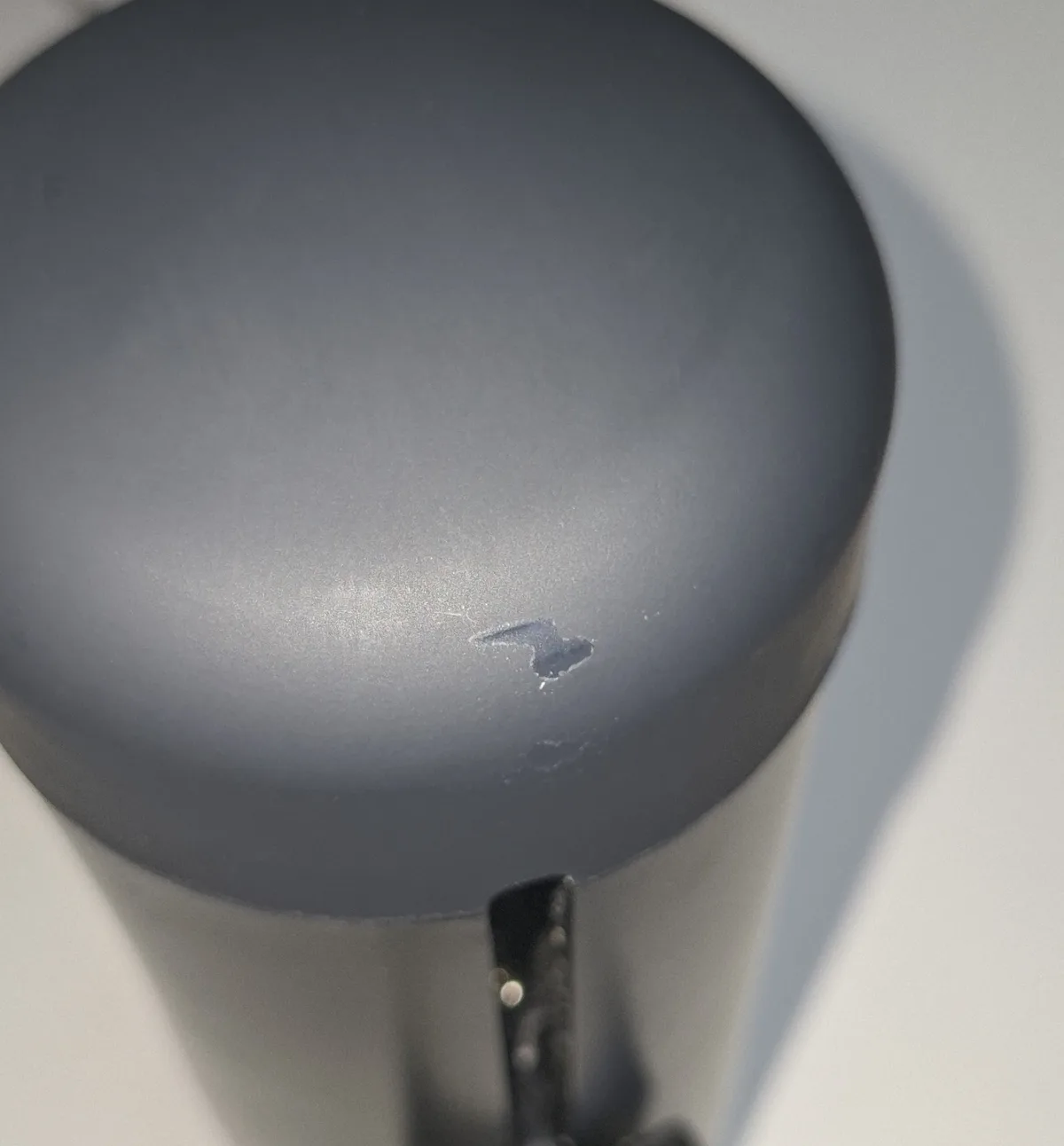
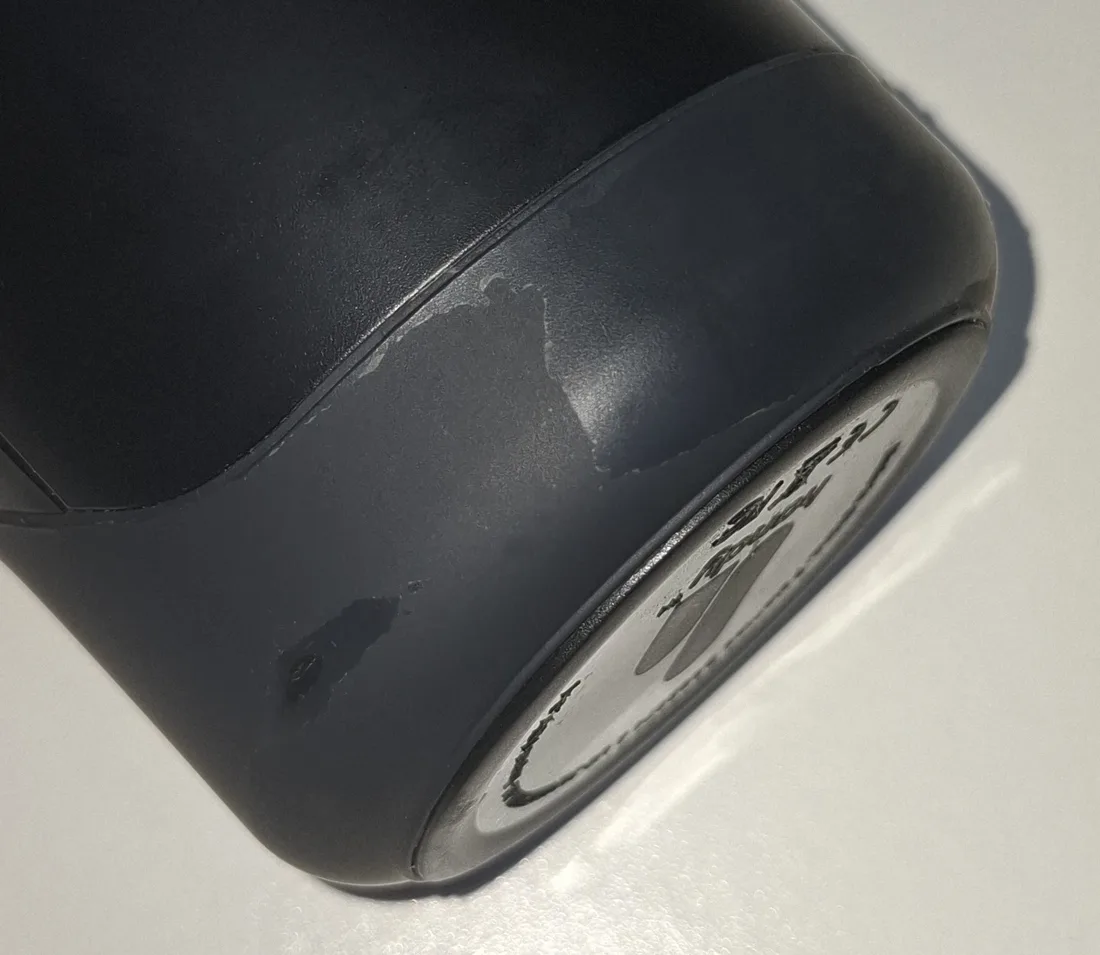
I cannot tell you with certainty what caused either one. The patch near the top sits in the area where my mounting ring goes, but under a silicone sleeve, so there is no metal touching the body there. The band along the bottom edge is nowhere near anything that clamps, and my guess is that it comes from sleeves rubbing against it, or from being the part I clean most often. Being under a protective sleeve is not the same as being unaffected by it, so I am not going to pretend I have settled this.
For what it is worth, a third party review reports that the soft touch shell on the Handy 2 Pro attracts hair and dust. Different complaint, same family of finish. I would call the coating the cosmetic weak point of the range, while keeping each observation attached to the generation it came from.
The grip and the band
The grip lost some of its firmness, and it is easily replaced with something off Amazon. The band that came with the device never held sleeves well: they slip during a session. Anecdotal in normal use, a real nuisance in VR, where stopping to fix it costs you the whole illusion. The TrueGrip Pro Band fixes it, and in my opinion it should have been the default in the box.
Worth noting before you plan around it: the warranty covers the motor, the gears and the electronics, and explicitly does not cover the sleeve or the band. Those are consumables, and the sleeves last two to three years each.
Disclosure: Some links above are affiliate links. I may earn a commission at no extra cost to you. It funds The Edgy and never affects what I recommend.
The regrease nobody tells you about
This is the part of the review I would most like people to read, because it reframes the complaint I see most often about these devices.
At some point, and I honestly cannot pin down when, maybe a year in, mine got noticeably clanky and started knocking at the end of a stroke. The obvious reading is that the motor is on its way out. It is not. The Handy documents this, and the cause is the factory lubricant drying out on the drive screw. Their own support page says that if your Handy is louder than usual you may need to lubricate it, and that extensive use and long sessions dry the lubricant faster. That is exactly the symptom I had.
So this is official maintenance, not a warranty voiding hack. That distinction took me a while to get right and it matters: I had filed this in my head as a risky intervention, and I was wrong in the reassuring direction.
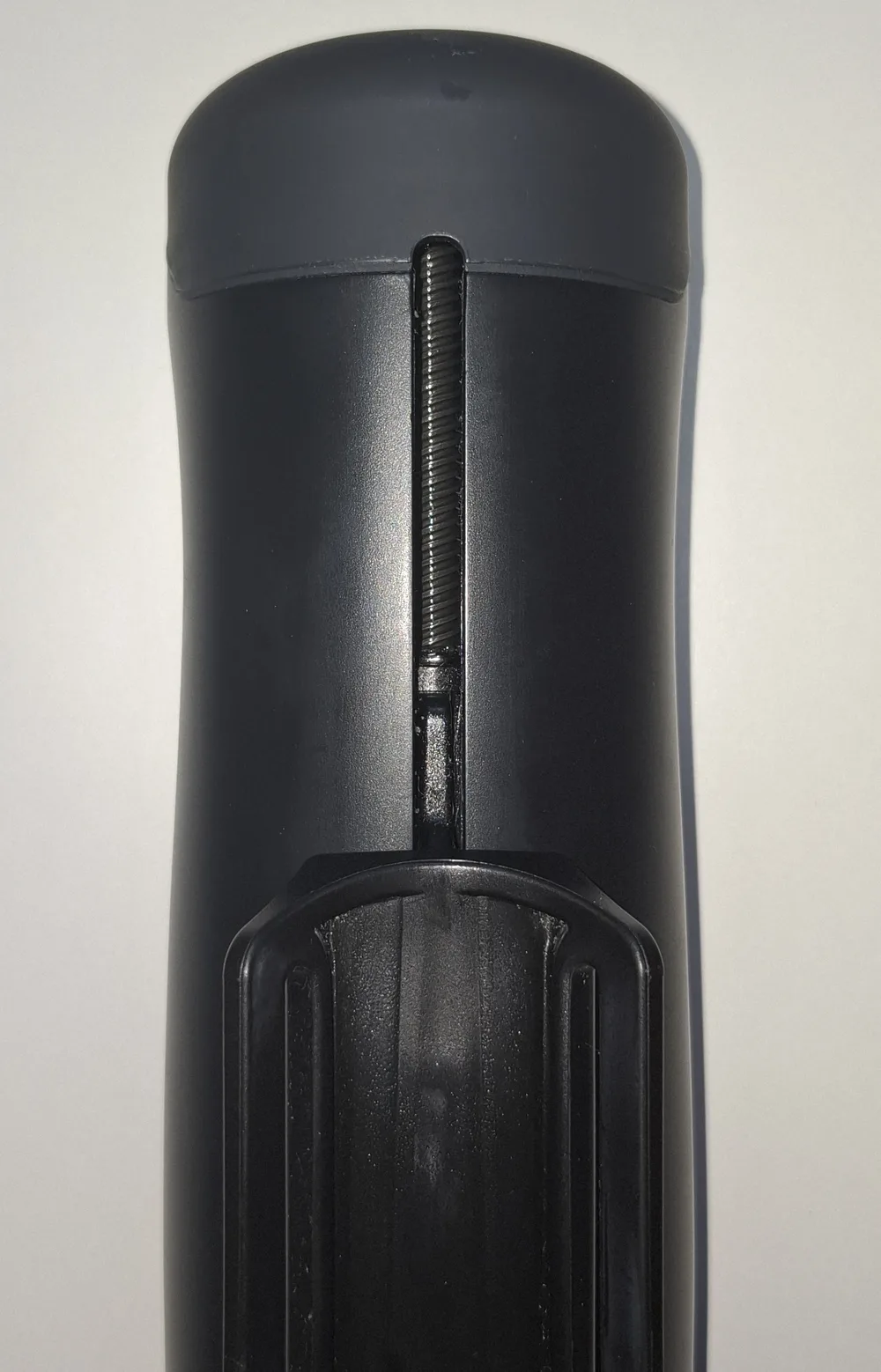
The procedure, as published
- Move the slider to the bottom.
- Apply a thin layer to the exposed metal screw through the slot. A cotton bud works well as an applicator.
- Cycle it by hand about ten times.
- Move the slider to the top and grease the newly exposed section.
- Run it at full stroke and minimum speed for five minutes.
Two things from the maker worth repeating. Do not apply much grease, because it gets thrown off once the device runs. And the grease they ask for is a high viscosity one, of the kind used for 3D printers or CNC machines. They name no brand, which they attribute to regulations differing between countries. I used a synthetic PTFE grease, which falls in that class, but the specific choice was mine and not a recommendation from them.
If you would rather not guess at the grease class, the maker sells an official maintenance kit with the exact lead screw grease, plus support rod oil and application brushes. I used a generic PTFE grease because I already had it on hand, but the kit is the zero guesswork route and it is what I would point a first timer to.
Disclosure: Some links above are affiliate links. I may earn a commission at no extra cost to you. It funds The Edgy and never affects what I recommend.
It worked. The knocking went away and the device went back to its normal noise level.
There is a connection here that I have not seen anyone make. Open ended sleeves can let fluid into the machine, lube included, and the drive screw is what that fluid can reach. It does not happen every time, but the risk is there, so if you use one, this maintenance is not optional housekeeping. It is the reason I stopped using the open ended sleeve.
Noise, and the one time it stopped
The official figure is 60 dB and that matches what I hear. It is audible. Not alarming, not something that carries through a closed door in my experience, but present enough that I always use headphones. That is partly for the audio and partly because it is easier to forget there is a machine involved.
Now the one incident, and I want to give it its proper size rather than turn it into a headline. Once in three years, the device stopped mid session. It came after roughly fifteen minutes of intense vibrato across several levels, which means constant direction changes at high speed, about as hard as you can work this motor. It cut out and I finished by hand.
Here is the reassuring part, and the reason I would not call it a fault. This is a designed in thermal cutout, not a breakdown. The device runs too hot, so it protects itself and stops. Other owners report the same behaviour, and the maker clearly anticipated it: the device even signals the state over its event stream, which means software like The Edgy can see it coming and react. A machine that watches its own temperature and steps in before it cooks itself is doing exactly what you would want. One occurrence in three years, under a pattern nobody runs by accident, is a ceiling worth knowing about rather than a reason not to buy.
Handy 1 vs Handy 2
The rows below are the two spec sheets, side by side. They are quoted from the official product pages. I now use a Handy 2 as well, and my comparison from use, noise, battery, sleeves and mounting included, is in my Handy 2 review.
Stroke length
Handy 1
0 to 110 mm (0 to 4.33 in)
Handy 2
0 to 125 mm (0 to 4.92 in)
Published speed
Handy 1
10 to 600 strokes per minute
Handy 2
32 to 400 mm/s (Standard), 32 to 450 mm/s (Pro)
These two rows are not comparable. Handy publishes the Handy 1 in strokes per minute only, and the Handy 2 in mm per second only. Converting between them would mean inventing a figure the maker never published, so I have left them as they are.
Overclocking
Handy 1
No
Handy 2
1 to 800 mm/s, Pro only
The same official page that lists overclocking states that it voids the warranty. It is also a Pro feature, not something the Standard has.
Power
Handy 1
Mains, no battery
Handy 2
Battery plus USB-C, rated about 1 hour (Standard) or about 5 hours (Pro)
Corded means a socket decides where it sits, and it also means a session never ends because a battery ran out. Which of those matters more is a personal call.
Weight
Handy 1
700 g (1.54 lb)
Handy 2
805 g (1.77 lb) (Standard), 810 g (1.79 lb) (Pro)
Several third party shops list the Handy 1 at 1.6 kg (3.53 lb). That is the shipping weight of the box with the power supply and accessories, not the device.
Noise
Handy 1
60 dB
Handy 2
Under 60 dB
Connection
Handy 1
Wi-Fi and Bluetooth 4.2
Handy 2
Wi-Fi and Bluetooth 4.2
Both speak to The Edgy over the same native Wi-Fi API, with no third party app in between.
Hands-free
Handy 1
Mount sold separately
Handy 2
Two built-in mounting points, Desk Mount Kit sold separately
On both generations the kit is a separate purchase rather than something in the box.
Sleeves
Handy 1
TrueGrip
Handy 2
TrueGrip, with Fleshlight compatibility announced
The store wording is "future-ready, with Fleshlight compatibility". That is a roadmap item, so treat it as announced rather than as something you can buy and use today.
If you want my read on the shape of it rather than the rows: the Handy 2 is the more modern machine on paper, with more stroke and a battery, and the Handy 1 is lighter and never needs charging. Which of those you want depends on whether your device lives on a desk next to a socket or moves around.
Since then a Handy 2 has reached me, so I can add what the rows do not show. The motion is just as precise, it runs much more quietly, and it is easier to maintain. What you take on in exchange is the battery: mine ran flat mid-session before I noticed any warning, and the charger is not in the box. The details are in my hands-on Handy 2 review.
Who should skip it
- If discretion is your main constraint. It is audible. If you need something you can use without anyone in the next room having any idea, this is the wrong category, not just the wrong device.
- If you will not touch scripts, apps or a hands-free setup. Everything that makes this device special sits behind a little setup. If you want to unbox it and use it by hand with no fuss, you would be paying for the one thing you then would not use, and a simpler toy will do the job for less.
- If you need it hands-free the evening you unbox it. The mounting hardware is a separate purchase on both generations, and on my unit the cup is the part that broke. Hands-free is worth it, but budget for the kit and know the cup is the weak point.
- If you are set on using a Fleshlight with it. Community adapters exist for the Handy 1 and I would not do it: a Fleshlight in its case is heavy enough to strain the motor. On the Handy 2 that compatibility is announced through a ClickOn accessory, but announced is not delivered, and when I tried a Fleshlight on mine, the motor struggled with the weight there too.
On customer support: in three years I never had to contact them about my Handy 1. I did for the Handy 2, whose first unit was faulty: they found the cause from the device logs and a short video, and sent a replacement quickly, without argument. Beyond that, there is an active community and an official Discord around the device.
Frequently asked questions
Is the Handy worth it?
Yes. It is a well built device that has run for three years for me, including hours of running empty while I wrote code against it, and it still works. What you pay for is motion control: a stroker that software can steer in real time rather than one running a fixed pattern, which is what makes synced video and interactive sessions work. Going hands-free with it opens up VR and scenes where both hands are free, and that is where it really earns its place. The honest caveats are that it is corded, it is audible enough that headphones help, and the hands-free cup is the part most likely to break. There is also a large community and an official Discord around it, so you are rarely stuck alone with a problem.
How long does the Handy last?
Mine is three years old and still working, on a usage level well above normal: it runs during development as well as in sessions. Nothing in the drive has failed. The parts that have shown age are cosmetic or consumable: the soft touch coating has flaked in a couple of patches, the grip lost some firmness, and the hands-free cup broke at its screw insert. The sleeves are consumables and last two to three years each. That kind of longevity, on hardware that gets abused, is the real answer to whether it is good value.
Is the Handy loud?
The official figure is 60 dB, and that matches my experience: it is audible. I would use headphones or earphones, both to enjoy the audio and because it is easier to forget the machine. Worth knowing, and almost nobody says this: if yours has become louder than it used to be, that is a documented symptom of the lubricant drying out on the drive screw, not the motor wearing out. Regreasing it fixed the noise on mine.
Does the Handy need maintenance?
One thing, and it is official. The Handy publishes a procedure for lubricating the drive screw, and states that extensive use and long sessions cause the factory lubricant to dry up faster. The symptoms are a device that is louder than usual and that knocks at the end of a stroke. I did mine after several years with a synthetic PTFE grease and it went back to normal. The maker asks for a high viscosity grease of the kind used for 3D printers or CNC machines, and warns against applying too much.
Can you use the Handy hands-free?
Yes, and in my view it is where the device works best: VR, synced scenes, both hands free. The mounting hardware is sold separately on both generations. On my Handy 1 the desk mount itself does its job well and holds several angles without trouble. What failed was the cup: the plastic around the screw insert broke, so it could no longer be tightened. Handy publishes 3D files for the cup on Thingiverse under its own account, and the mounting thread is a standard quarter inch photo thread, so replacement paths exist.
Handy 1 or Handy 2?
I have used both. This page is about the Handy 1 I bought and have run daily for three years; the Handy 2 came later and has its own hands-on review. Having tried it, the Handy 2 keeps the same precise motion, runs much more quietly, has a longer stroke at 0 to 125 mm (0 to 4.92 in) against 0 to 110 mm (0 to 4.33 in), and works on a battery with USB-C where the Handy 1 needs mains power. Its weak points are about that battery: a low-battery warning I never noticed in time, and no charger in the box. Since the Handy 1 is discontinued, the Handy 2 is the one you can buy.
Does the Handy work without installing an app?
Yes. It exposes a Wi-Fi API, so a browser page can drive it directly with no app installed and no account on my side. That is how The Edgy talks to it. It is also why the latency is low: the commands go from the browser straight to the device API rather than through an intermediary.
Does the Handy overheat?
It has a thermal cutout that is built in by design, not a flaw. Once in three years, after roughly fifteen minutes of intense vibrato across several levels, mine ran hot enough to stop itself, and I finished by hand. Other owners report the same, and the maker anticipated it: the device signals the state over its event stream, so software like The Edgy can react to it. A machine that protects itself before it cooks is doing the right thing. Treat it as a ceiling you have to work hard to reach, not a fault.
Is there a discount code for the Handy?
Not for the Handy 1, which is discontinued. For the Handy 2, yes: Handy set up the code EDGY15 for readers of my reviews. It gives 15% off the Handy 2, Standard or Pro, and it works worldwide. Only the Handy 2 itself is discounted: other items in your cart stay at full price, and the code does not work on bundles or on items already on sale. The link on this page opens Handy's offer page with the code already applied.
The bottom line
Three years on one unit, used far harder than most owners will, and it is still the device I reach for. It is robust, the motion control is really good, and hands-free turns it into something a manual toy cannot touch. The maintenance it needs is documented and rare, the noise and the cord are real, and the cup is the part I would expect to replace. None of that changes the answer: I still recommend the Handy - and since the Handy 1 is discontinued, that means the Handy 2 today.
If you are buying, the Handy 1 reviewed here is discontinued, so the model to get is the Handy 2: the same native Wi-Fi link to The Edgy, with a longer stroke and a stronger motor, now cordless. Everything this review says about how the Handy moves and how long it lasts is why I still point people at the line.
Handy 2 discount code
Reader discount
15% off at checkoutThe Handy 2 only, Standard or Pro
- Other items in your cart stay at full price
- Not valid on bundles
- Not valid on items already on sale
The button below opens Handy's offer page with the code already applied. On Handy's main store, enter it at checkout.
Disclosure: Some links above are affiliate links. I may earn a commission at no extra cost to you. It funds The Edgy and never affects what I recommend.
Already own one?
The Edgy is the browser player I built for this device. It runs in a tab, it talks to the Handy directly, and it costs nothing to try.
How this page is funded
The Edgy is free. The whole player, the seven built-in behaviors, the built-in music sets and the full editor, with no account, no subscription and no ads. The one thing I sell is an optional pack of ready-made behaviors on Ko-fi, for people who would rather not build their own. Nothing in the player is locked behind it.
Some links on this page are affiliate links. If you buy through one, the brand pays me a commission at no extra cost to you, and that is what pays for the hosting and the hours that go into building this. It is the reason the app can stay free.
Free device. Handy sent me a Handy 2 for free. Thanks to them for that. My hands-on notes here come from the Handy 1 I bought. They did not approve this review and had no say in what I wrote.
What it does not buy: my opinion. I am one developer, not a review farm. No brand pays for a spot on this page, for a ranking, or for a good word. Commission rates differ between brands and I do not rank on them. Specs are sourced from the manufacturers and stated as such, hands-on impressions are my own, and the shortcomings stay in even when they cost me a sale. If a device is not right for you, I would rather say so than sell it to you.
More detail in my legal notice.